
Guide · Getting started
Which voter file do I have?
A voter file is just a spreadsheet: one row per registered voter, one column per fact about them. This page tells you where to get one, which shapes we accept, and the nine columns every file needs.
Where a voter file comes from
You get one from your county elections office, from the Secretary of State, or from a vendor who got it from one of those two. In California, a county file is usually the quickest thing to obtain, and a statewide file is the better one to end up with — more on why below.
It will arrive as a CSV, or as a text file with tabs between the columns. We take both. We also don't care about capital letters in your column headings: PARTY, party and Party are all the same to us.
Before you worry about getting it wrong: importing a file only ever adds voters and refreshes the ones already there. It never deletes anybody. You cannot break your data by trying.
The nine columns every file needs
Whatever shape your file is, these nine have to be in it:
- A voter ID — any stable per-voter ID from your source
- First and last name
- House number, street, city, state and ZIP
- Precinct — the county's precinct code, which drives your precinct pages, maps and turf
Two more are strongly advised. Date of birth is the sharpest way to tell two people apart — think of a father and son at the same address with the same name; without it, nothing can separate them. And a mailing address, when it differs from where someone lives: a mailer posted to the house of a voter who gets their mail at a PO box is postage spent on nobody.
Everything else is optional. Party, phone, email, registration dates, vote history and about forty more columns are all kept when they are in your file, and simply empty when they are not.
The three shapes of file
The app tells you which one you have as soon as you upload. Here is what each one buys you.
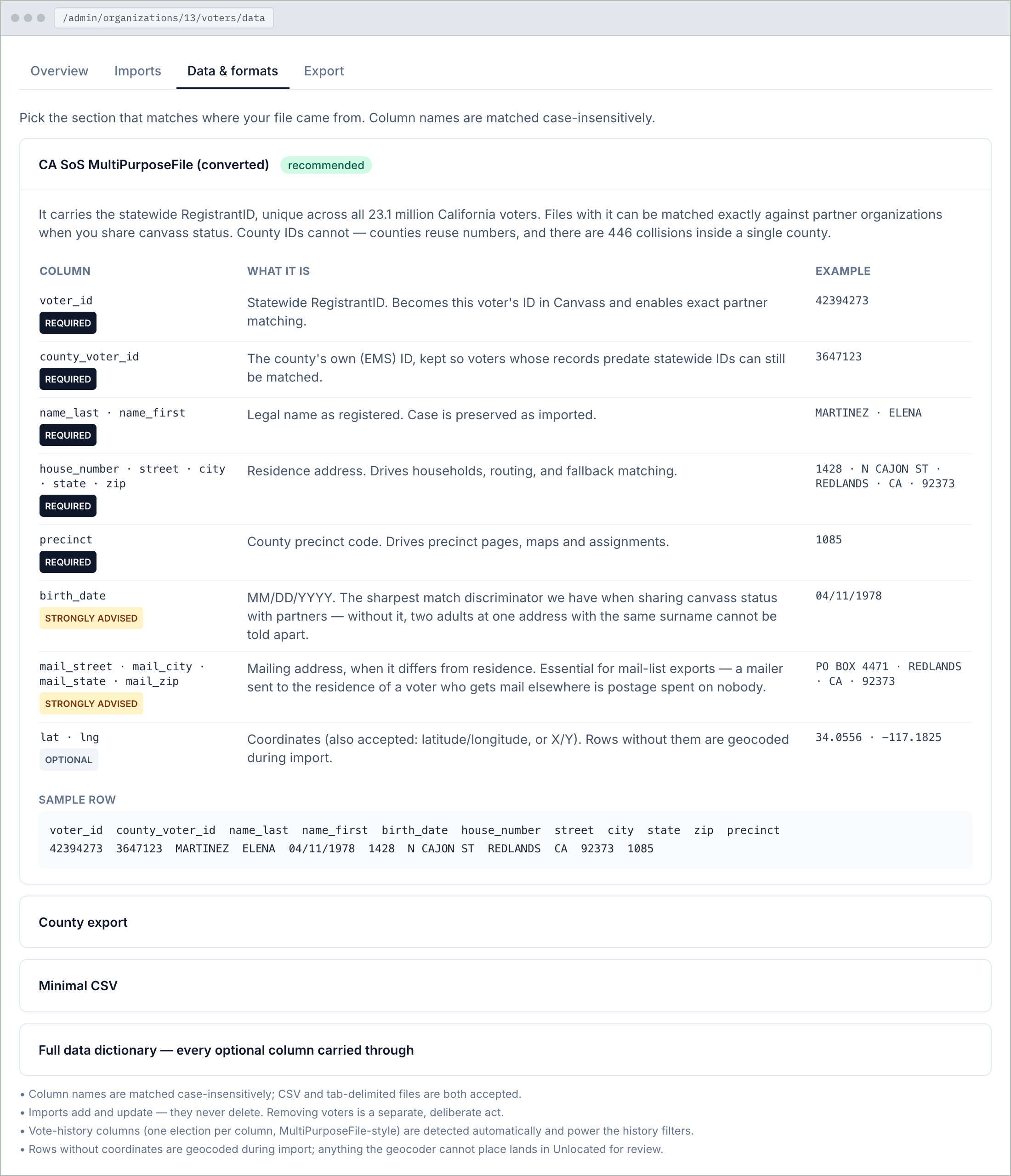
CA SoS MultiPurposeFile (converted) — the best one to have. It carries a statewide voter ID that is unique across every California voter, which is what lets two organizations working the same doors agree, with certainty, that your Elena Martinez and their Elena Martinez are the same person.
County export — what your county elections office hands you. Everything works: walk lists, maps, routes, reports. The one thing you give up is that certainty when sharing with a partner, because county IDs are reused from county to county, so matching falls back to address, name and date of birth.
Minimal CSV — the nine required columns and nothing else. If that is all you have, it is enough to start. You can always come back later with a richer file: because importing only adds and updates, the better file simply fills in what the first one was missing.
Required columns
voter_id · name_last · name_first · house_number · street · city · state · zip · precinct
The full column reference, with examples and every optional column, is on the Data & formats tab inside the app.
Two columns worth asking your county for
Vote history — one column per past election, which is how county files usually come. We spot those automatically and turn them into the question you actually want to ask: how many of the last five elections did this person vote in? That powers every turnout filter in the app.
Latitude and longitude. If your file has them, good. If not, we work out each address's position on the map while importing — it takes longer, and anything we genuinely cannot place is listed for you to review rather than thrown away.
Got your file? The app checks it before anything is committed, and tells you exactly what it found.
Open your Data & formats tab Start free trial